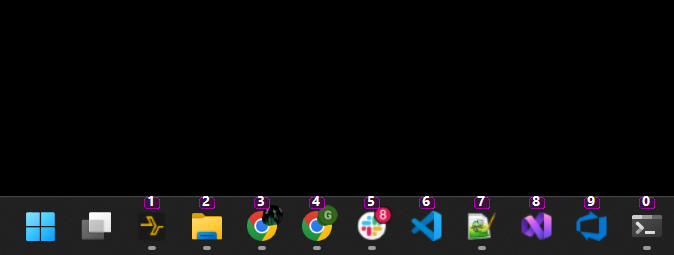
How does it work?
Windows has a built-in trick: hold the Windows key and press a number to instantly open or switch to that app on your taskbar. The first app is 1, the second is 2, and so on.
The only problem is there's no visual reminder of which number belongs to which app. This tool fixes that by drawing small labels directly on top of each icon — always visible, always up to date.
Getting started
- Download the installer using the button above.
- Run the installer. Follow the short setup wizard and the app will be installed and started automatically.
- Numbers appear on your taskbar. You'll see small labels on your pinned apps right away.
- Press Windows + a number to jump to that app instantly.
💡 The installer sets the app to start automatically when you log in, so you don't have to do anything extra.
Good to know
- It runs quietly in the background and uses very little power.
- Clicking your taskbar or other apps works exactly as normal — the overlay doesn't get in the way.
- The numbers update automatically if you rearrange your taskbar icons.
- Works with multiple monitors.
- To stop it, right-click the icon in the system tray and choose Exit. To uninstall, use Add or remove programs in Windows Settings.
Want to tweak how it looks?
The app creates a small settings file called settings.json in its installation folder. You can open it in Notepad to change things like the size of the number badges, how far up or down they sit on the icon, and what colour they are. Save the file and restart the app to see your changes.